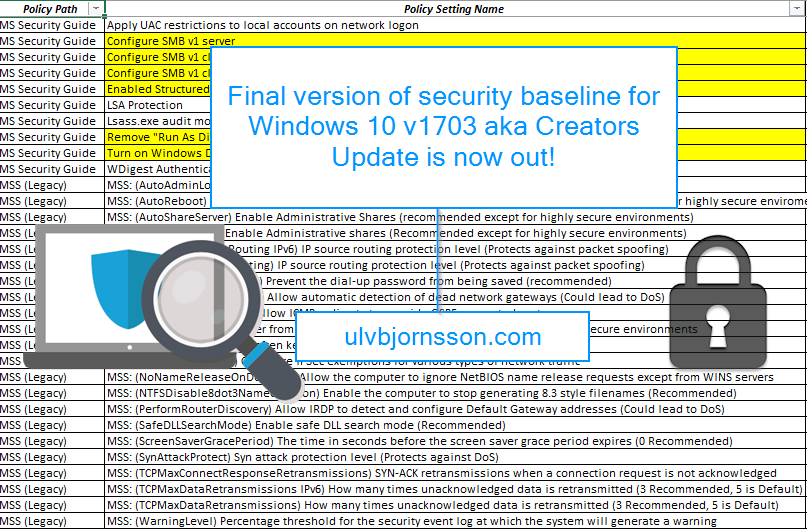
Now you might ask, why should I use a security baseline? First off – it’s for OS hardening, and it saves you a lot of manual work by having ready made settings setup and gives you the importable GPOs, as well as a multitude of custom ADMX files with them visually laid out for you in a spreadsheet.
This allows you to tweak your settings to what best suits your environment.
It’s an incredibly helpful tool for image building, particularly for those of us in verticals that require constant vigilance.
Now if you are new to OS hardening and security baselines, you really should check out Microsoft’s Security Compliance Toolkit!
You can get the Security baseline for Windows 10 “Creators Update (v1703) from here.
Event ticket is booked, and plane tickets are locked-in!
Who else is going to the World Blockchain Forum? It’s being held in London from September 25th to the 26th, and also the Dash Conference is on the 24th of September!
It’s a very exciting time, with the increased adoption of blockchain technology, the pace of innovation and the amount of money being thrown after ICOs. This conference will have a wide array of exciting topics from blockchain, bitcoin, ethereum, ICOs and investing, regulations, startups and disruption and so much more!
Some of the biggest personalities, developers and minds in the industry will be speaking and presenting in 20-minute time slots throughout the two-day conference.
Objective: To enable integration between Powershell and Office 365 to facilitate; AirWatch Mobile Email Management (MEM).
“Mobile Email Management (MEM) functionality in AirWatch delivers comprehensive security for your corporate email infrastructure by allowing only compliant users and devices to access email.”
To some it may have passed under the radar, for others it might be of interest.
Microsoft has released a bug bounty program for hackers, white hats, bug hunters and security researchers alike to discover, find and report vulnerabilities to Microsoft to strengthen the Microsoft portfolio.
Microsoft having dominated the market for home users and business computers have long been a favored target for cyber criminals, hobby hackers and other nefarious operatives. Meaning that just a zero-day vulnerability or any breach can cause a crisis like the recent WannaCry ransomware attack.
Microsoft has previously had bug bounty programs, but mostly they have been limited in time, or for specific suites.
In this article I’ll walk you through the steps needed to connecting to your Microsoft Azure environment, as well as giving you a glimpse of how you can manage it by starting up a IaaS virtual machine.
There is endless potential, to what you can manage and automate of Azure resources with PowerShell, but from here to there, first step is connecting it!
Hey, so if you are getting this error I’ll walk you through the easiest ways to remedy it.
PS C:\> Get-AzureVM
Get-AzureVM : ForbiddenError: The server failed to authenticate the request. Verify that the certificate is valid and i s associated with this subscription.
At line:1 char:1
+ Get-AzureVM
+ ~~~~~~~~~~~
+ CategoryInfo : CloseError: (:) [Get-AzureVM], ComputeCloudException
+ FullyQualifiedErrorId : Microsoft.WindowsAzure.Commands.ServiceManagement.IaaS.GetAzureVMCommand
or
Set-AzureSubscription : ForbiddenError: The server failed to authenticate the request. Verify that the certificate is valid and is associated with this subscription.
The solution often is easier then you’d think, just like how browsers have their cache so does your Microsoft Azure PowerShell so you’ll want to input this:
Clear-AzureProfile
This will clear your current Azure profile.
You should also consider deleting the content of this folder:
and then you can execute any Azure PowerShell commands that you’d like to run. For a more detailed walkthrough check my article on connecting and managing Microsoft Azure via PowerShell.
PS: If you are still getting errors, you should check whether the mode you are running in is incorrect you can input
Switch-AzureMode AzureResourceManager
Important to note that “Switch-AzureMode” is deprecated and will be removed in a future release. However doing so seemed to import the certificate and removed the “ServiceManagement” modules that were loaded with this install and installed the correct certificate.
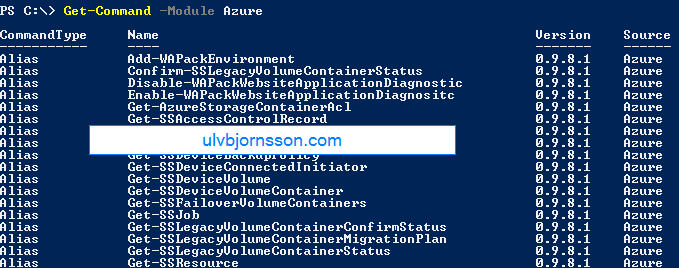
So now to see if it’s working we can run Get-AzureVM or Get-AzureRMvm
which outputs:
As always, you can follow me on Twitter at @UlvBjornsson or follow me on here, if you have tips for articles you’d like to read or topics you want to hear more about, hit me up.
Busy days, we had WannaCry remind us about the importance of patch compliance and mitigation (add political pun about encryption and weapons) and we saw IT and business rally to mitigate, patch and get their heads over water.
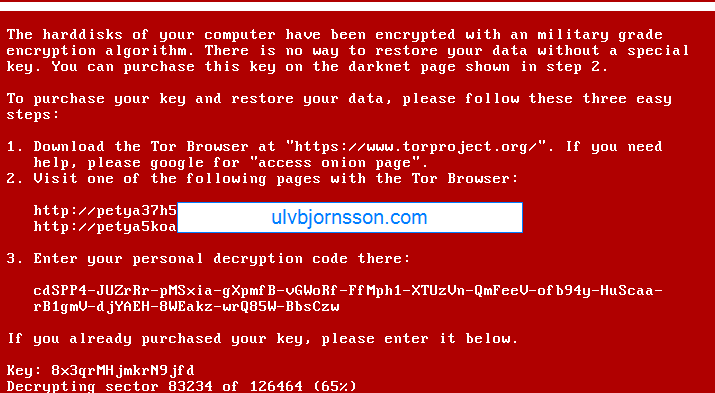
NotPetya spread over the same attack vector and utilized PsExec with the SMBv1 vulnerability but had a much more complicated payload, which turned out to not be ransomware, but a wiper prompting for a ransom, allowing no way to decrypt essentially rendering the data lost.
So with that in mind I decided to write a post about the upcoming Windows 10 Fall Creators Update, touching on Windows Defender ATP and security in general, and my thoughts surrounding it..
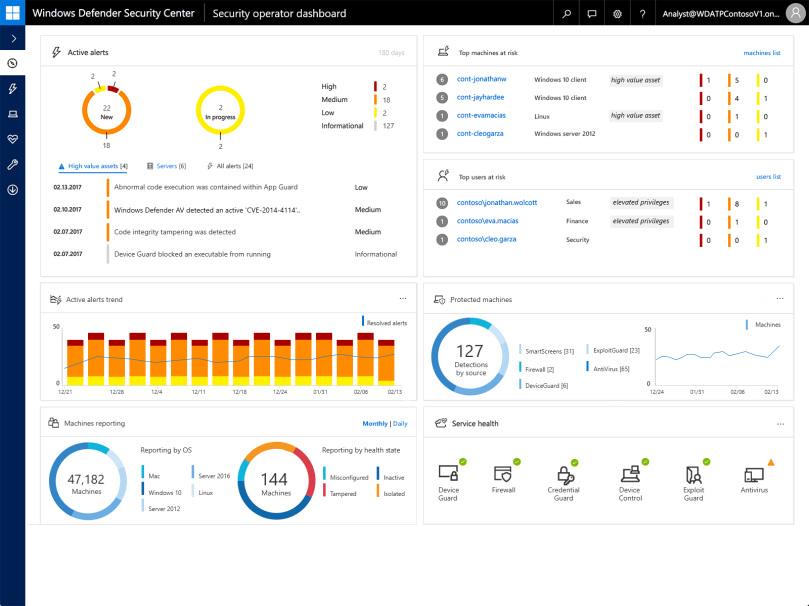
First off, it integrates Windows Defender Advanced Threat Protection (ATP) into Windows 10 essentially unifying the Windows threat protection stack.
To sum it up, it’s built in and not added on.
Security is complicated, it involves layer upon layer, there is exterior security, interior security, network, information, os hardening, user training and so on.
One of the best things with ATP?
It integrates with cloud intelligence and the rest of your security, giving you a single pane of glass for administration.
Windows Defender ATP dashboard view
Now what is the ATP? It covers a range of features such as:
Windows Defender Exploit Guard
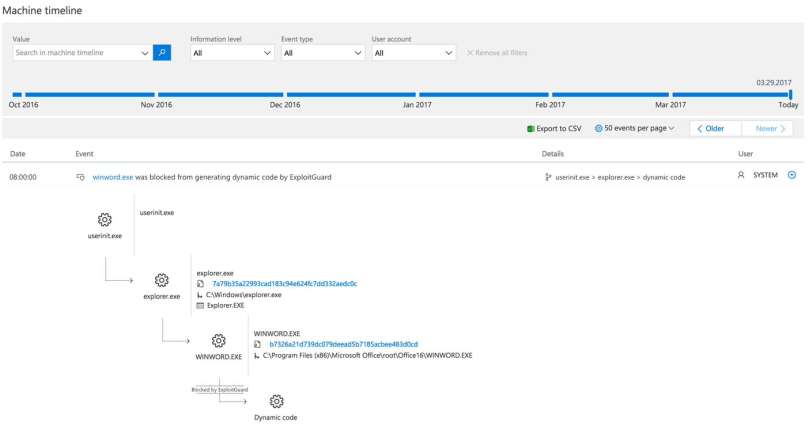
Windows Defender Explot Guard (WDEG) uses information from the Microsoft Intelligent Security Graph (ISG) and provides a heavy set of intrusion rules and policies to assist and prrevent advanced threats, as well as zero day exploits.
Machine timeline from Exploit Guard
Windows Defender Application Guard
A real winner here I believe, we’ll see how it turns out when it goes live for everyone, but I like the idea of Windows Defender Application Guard (WDAG) because even if the OS stack, network stack is secure, does not necessarily mean your third-party applications for example your browser is. Example and point: when Tim in accounting accidentally downloads malicious malware or Rambo in security triggers a zero-day worm whilst researching in the wrong container, WDAG will isolate and contain the threat. Keeping your device, apps and data secure. At least in theory.
Windows Defender Device Guard
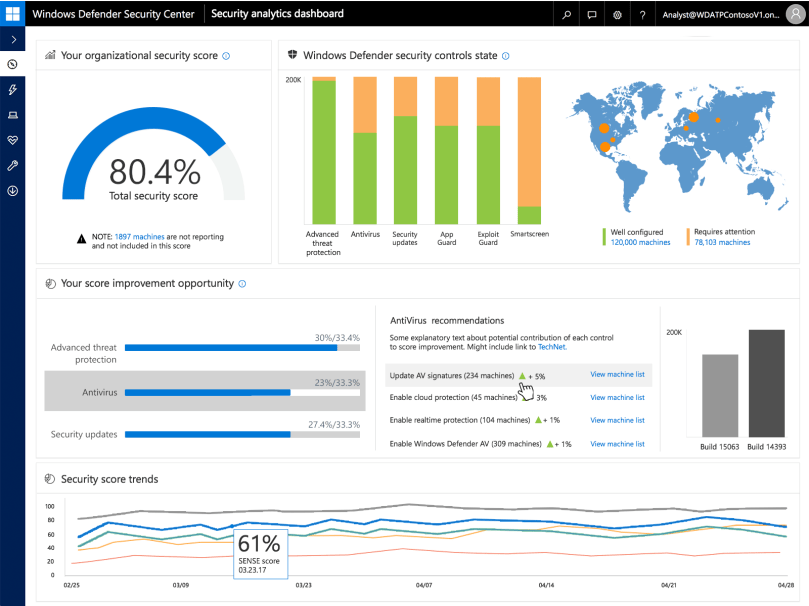
Also integrated into ATP, Device Guard allows whitelisting of applications on a per-device basis and if anything it gives the Security Operations Center better insight, and automated application control as well as implementation of DDG into ATP gives organizations an easy implementation. Well improved detection, response capabilities and a growing detection dictionary that includes more indicators of attacks (IoA) with a large suite being gathered into one product in the Windows threat protection stack will allow you to remedy, as well as spot weaknesses far faster then before, and reduces the overhead required and the custom implementations required to make all the systems “talk“.
So what is my take from this? I thoroughly believe that the creator of a product (Microsoft) is most likely the best to create a security solution best suited for their product (Windows and surrounding services).
To sum it up ATP integrated with Windows 10, and Cloud Intelligence (Office 365, Microsoft Azure) will be a huge step in the right direction, and be a valuable asset to any Service Operations Center or IT operation team.
As always if you have any suggestions about topics, articles, how-to’s and what not hit me up here or on twitter at @UlvBjornsson
So, in Azure you pay for what you use. If it’s on (or if it is allocated), you are paying for it, until it is deallocated.
So what can we do to save costs? We can configure automatic shutdown.
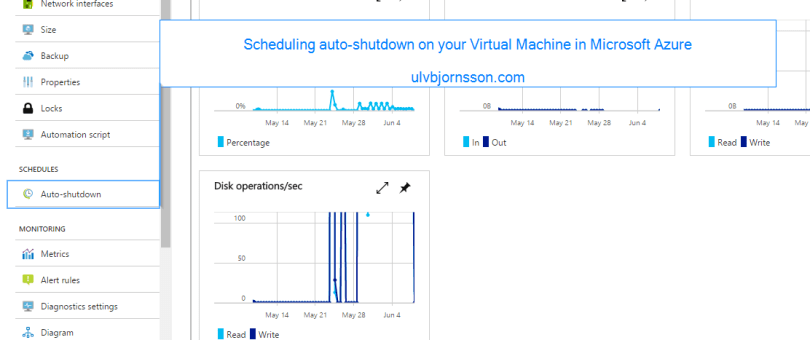
So if we enter “Auto-shutdown” on the left panel in the VM:
So let’s enable it, and set our preferred time for shutdown. Ensure that you have configured the timezone correctly so that it shutsdown when you expect it to.
There you go, you’ve configured automatic shutdown on a schedule.
Next up, we’ll be looking at runbooks and the possbility of turning your virtual machines off, but also on again on a fixed schedule.
Stay tuned for more, and always you can reach me here or over on twitter at @UlvBjornsson.
If you are curious about the Azure exam 70-533, you can check out my write up on it over here.
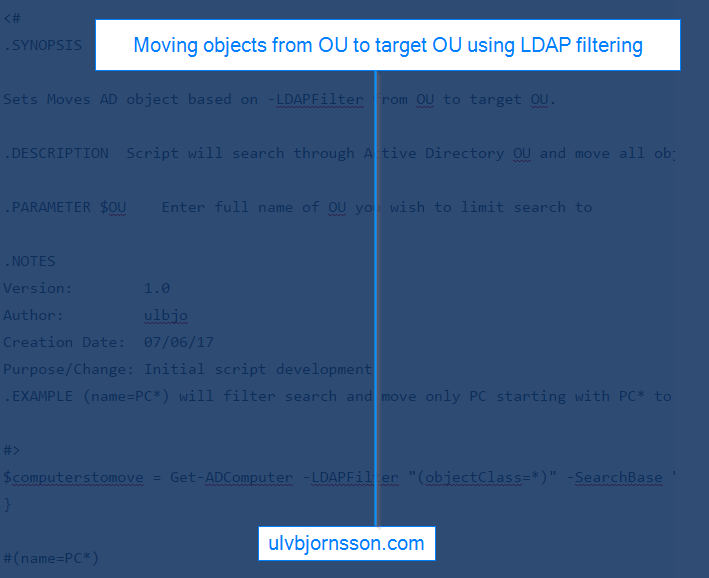
Simple way to move computers from one OU to a target OU using –LDAPFilter which allows you to modify it. Current form is objectClass meaning it’ll move anything that is designated an objectclass from OU to target OU, you can change this to be (name=PC*) with * being a wildcard moving any object starting with PC from OU to target OU.
<#
.SYNOPSIS

Sets Moves AD object based on -LDAPFilter from OU to target OU.

.DESCRIPTION  Script will search through Active Directory OU and move all objects matching -LDAPfilter to target OU.

.PARAMETER $OU    Enter full name of OU you wish to limit search to

.NOTES
Version:        1.0
Author:         ulbjo
Creation Date:  07/06/17
Purpose/Change: Initial script development
.EXAMPLE (name=PC*) will filter search and move only PC starting with PC* to target OU.

#>
$computerstomove = Get-ADComputer -LDAPFilter "(objectClass=*)" -SearchBase "CN=Computers,DC=Customer,DC=ulvbjornsson,DC=com"foreach ($computertomove in $computerstomove) { Move-ADObject $computertomove -TargetPath "OU=Computers,OU=Production,DC=Customer,DC=ulvbjornsson,DC=com"
}

#(name=PC*)
As always hit me up, I got a lot of articles in the pipeline so stay tuned.
You can find me here, or interact with me over twitter @UlvBjornsson
As some of you know I have a background with private cloud and as of late been moving more and more towards the hybrid cloud, to take advantage of Microsoft Azure.
Run 2 small Virtual Machine instances for the entire month, or
Store 800 GB of data in Storage, or
Develop and test a web application using Cloud Services, with 3 web roles and 2 worker roles on medium instances, for 10 hours a day, 5 days a week, or
Run two S2 SQL databases for the entire month
One of the challenges with the exam is that it is quite broad and to understand the width you need hands on experience, thankfully the hands on labs from Microsoft were great.
The exam also covers Powershell as well as JSON examples, that you have to plot in the right cmdlet for – so get used to it, throw up an editor, or run through the practice test.
A strong suggestion that I urge you to follow through with it, get an Azure trial, the best way to familiarize yourself with Azure is by using it, and also to understand the basics of the ARM deployments and the Powershell scripts.
GitHub has many great repositories that let you get a full infrastructure up and running in no time, however to maximize your trial, remember to turn things off or deleting them so you can get the most out of your thirty day trial.
Some workplaces also have free trials up and running, so ask a colleague you might already have an environment dedicated for Azure testing.
Conclusion
I am happy to announce that I did pass the 70-533 exam, it was a challenge, and really happy to have passed it. These days a lot of my time is spent on researching new Azure features, looking at ways I can implement them and also quality assurance, ensuring they have a place in a customers production environment.
I would recommend the exam to anyone wanting to formalize their knowledge, but also wanting to dive deeper into Microsoft Azure. Let me know how your preparation or exam is going in the comments, and as always hit me up here or on twitter at @UlvBjornsson if you have any ideas for future articles or thoughts you’d like to share.








 Well improved detection, response capabilities and a growing detection dictionary that includes more indicators of attacks (IoA) with a large suite being gathered into one product in the Windows threat protection stack will allow you to remedy, as well as spot weaknesses far faster then before, and reduces the overhead required and the custom implementations required to make all the systems “talk“.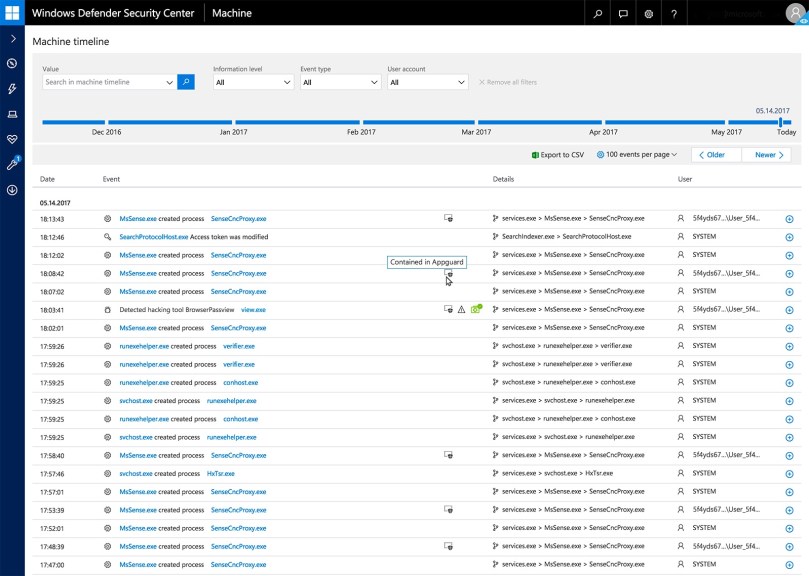






 musings of a consultant