Configuring VMware Identity Manager for Salesforce – Part 1

Now we’ll look at configuring SAML integration between VMware Identity Manager and Salesforce for Workspace ONE.

Definition:  Security Assertion Markup Language (SAML). It is an open standard which enables SSO for many different services and platforms. Authenticating with SAML allows a user to log in once per session.

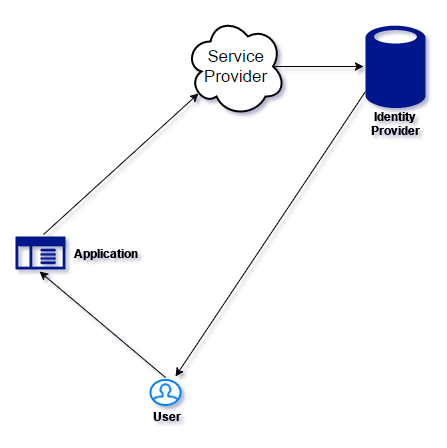
Here are the defining components of SAML:

  • Service provider (i.e. an application.)
  • Identity provider (who is authenticated, and what authentication methods are used.)
  • End user who is accessing over SAML.


idp.png

  1. User starts the SAML Application
  2. Service Provider (SP) sends a request to the Identity Provider (IdP) for authentication
  3. If the user is not authenticated, the IdP requests authentication from the user. (I.e. username and password)
  4. The IdP then sends response to the SP with a token for that user.

Continue reading “Configuring VMware Identity Manager for Salesforce – Part 1”
VMware AirWatch PowerShell Integration for Mobile Email Management and more

AirWatch, it’s here to stay.

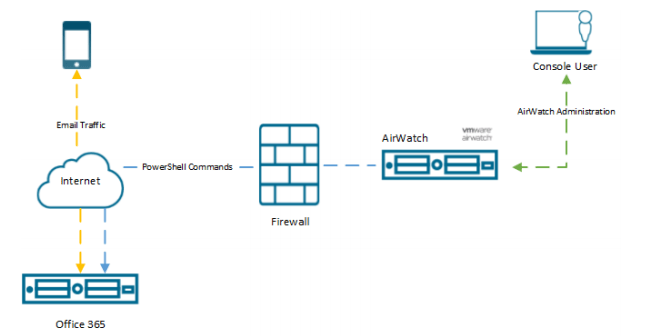
So let’s talk about AirWatch, Office 365 and Powershell.

Objective: To enable integration between Powershell and Office 365 to facilitate; AirWatch Mobile Email Management (MEM).


“Mobile Email Management (MEM) functionality in AirWatch delivers comprehensive security for your corporate email infrastructure by allowing only compliant users and devices to access email.”

chrome_2017-08-02_16-05-51.png

Now to getting this up and running

The steps we will be taking are

  • Integrate PowerShell with AirWatch
  • Setting up a PowerShell Admin User
  • Enable Powershell Integration in AirWatch
  • Configure Exchange to Block or Quarantine Devices
  • Email Management
  • Cmdlets Executed by AirWatch

Continue reading “VMware AirWatch PowerShell Integration for Mobile Email Management and more”

Installing VMware Identity Manager Connector

Hi again, and now we’ll go through how you install a VMware Identity Manager Connector.

First off with the prerequisites and some data you need to have to proceed through this guide:

You will need:

  • VMware Identity Manager-tenant
  • OVA-file (the VMware Identity Manager Connector software)
  • Set up a DNS record
  • Service Accounts: for binding to LDAP and domain joining the Connector
  • Connector activation code (which we gather from our VMware Identity Manager-tenant)

Continue reading “Installing VMware Identity Manager Connector”

Setting up AirWatch for Integration with Identity Manager: Part 2

Configure AirWatch settings in VMware Identity Manager to integrate AirWatch with VMware Identity Manager and enable the AirWatch feature integration options. The AirWatch API key and the certificate are added for VMware Identity Manager authorization with AirWatch.

Now if you are just jumping into this series, you need to know that you require to have this in place to complete the steps outlined here. If you haven’t you can check out Part 1.

  • AirWatch server URL that the admin uses to log in to the AirWatch admin console.
  • AirWatch admin API key that is used to make API requests from VMware Identity Manager to the AirWatch server to setup integration.
  • AirWatch certificate file used to make API calls and the certificate password. The certificate file must be in the .p12 file format.
  • AirWatch enrolled user API key.
  • AirWatch group ID for your tenant, which is the tenant identifier in AirWatch.


Continue reading “Setting up AirWatch for Integration with Identity Manager: Part 2”

Setting up AirWatch for Intergation with Identity Manager: Part 1

First off ensure you have this in place:

  • The organization group in AirWatch that you are configuring VMware Identity Manager is organization type: Customer.
  • REST API admin key for communication with VMware Identtiy Manager service and a REST enrolled user API key for AirWatch Cloud Connector password authentication are made at the same organization group where VMware Identity Manager is configured.
  • API Admin account settings and the admin auth certificate from AirWatch added to the AirWatch settings in the VMware Identity Manager admin console.
  • Active Directory user accounts set up at the asme organization group where  VMware Identity Manager is configured.
  • If end users are placed into a child organization group from where VMware Identity Manager is configured after registration and enrollment, User Group mapping in the AirWatch enrollment configuration must be used to filter users and their respective devices to the appropriate organization group.

You can find these in your AirWatch Admin console:

  • REST admin API key for communication: System -> Advanced -> API -> REST API
  • API Admin account for VMware Identity Manager and the admin auth certificate that is exported form AirWatch and added to the AirWatch settings in VMware Identity Manager.
  • REST enrolled user API key used for AirWatch Cloud Connector password authentication.


Continue reading “Setting up AirWatch for Intergation with Identity Manager: Part 1”

Integrating AirWatch with Active Directory

We are going to connect your AirWatch environment with your Active Directory. We will be using the Directory Services page to configure the settings that let you integrate your AirWatch server with your organization’s domain controller (the server hosting your directory services system).

The scenario outlined in this tutorial assumes that you already have the following items:

  • Active Directory
  • AirWatch

Continue reading “Integrating AirWatch with Active Directory”